Connect Delightree to the tools your franchise already uses, and stop re-entering data
Add a user or location in Delightree once, and Zapier can send it to your CRM. Delightree also connects directly to POS and payroll systems like Toast and ADP.


![[solidcore] logo](/assets/customer-logos/solidcore-black-logo-logo.png)




Trusted by franchise and multi-location brands
Delightree works with the tools you already use
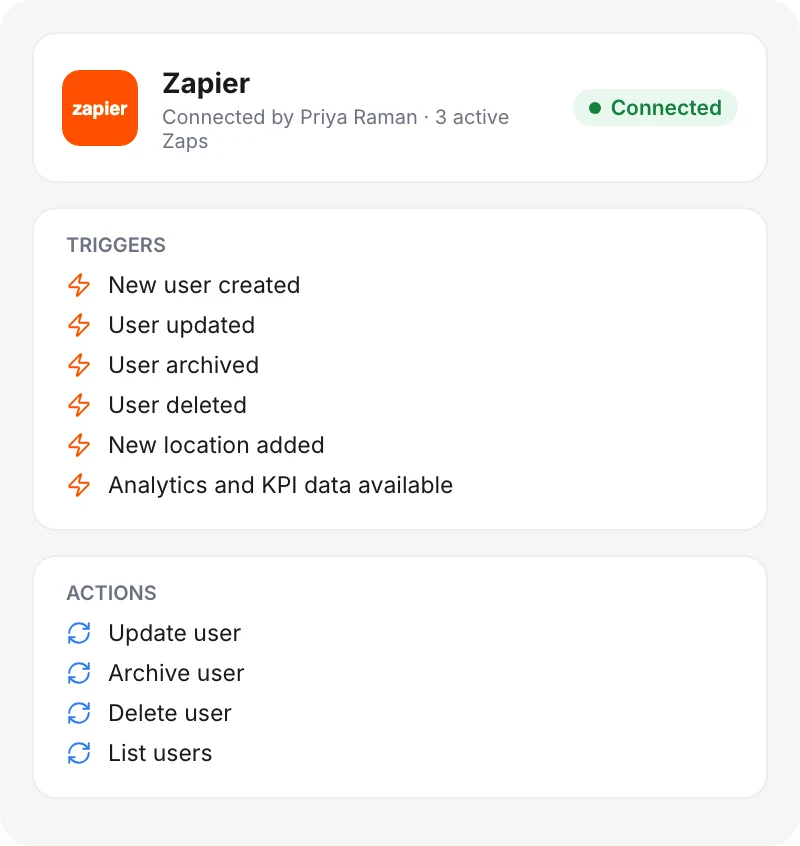
Your CRM and BI tools stay in place. Delightree sends them user and location changes through Zapier, along with the KPI data your dashboards already track.
Too many logins across separate tools
In the words of franchise operators working across systems that don't share data.
Twelve passwords to run the business
“We have a document drive, a course tool, a franchise dashboard, a data warehouse. I have twelve passwords just to reach the most important things.”
Another silo to manage
“If it doesn't push data directly into Zenoti, it just creates another silo I have to manage.”
Every system segregated
“In the last three companies I've been with, each system was segregated and so we didn't know what marketing was doing or what operations was doing.”
Too many systems
“Too many systems we'd love to consolidate and not be playing in 10 different systems.”
What disconnected tools cost a franchise network
When systems don't share data, people re-type it into each one.
Typing the same record twice
Someone enters a new location in the CRM, then enters it again in Delightree. The two copies stop matching, and nobody knows which one is right.
People keep their logins after they leave
When an employee leaves, someone has to remove them from every tool by hand. Any account that person forgets to remove keeps working after the employee is gone.
Week-old reports
Someone exports KPI data to a spreadsheet once a week. By the time leadership reads it, the numbers are already out of date.
How Delightree integrations work
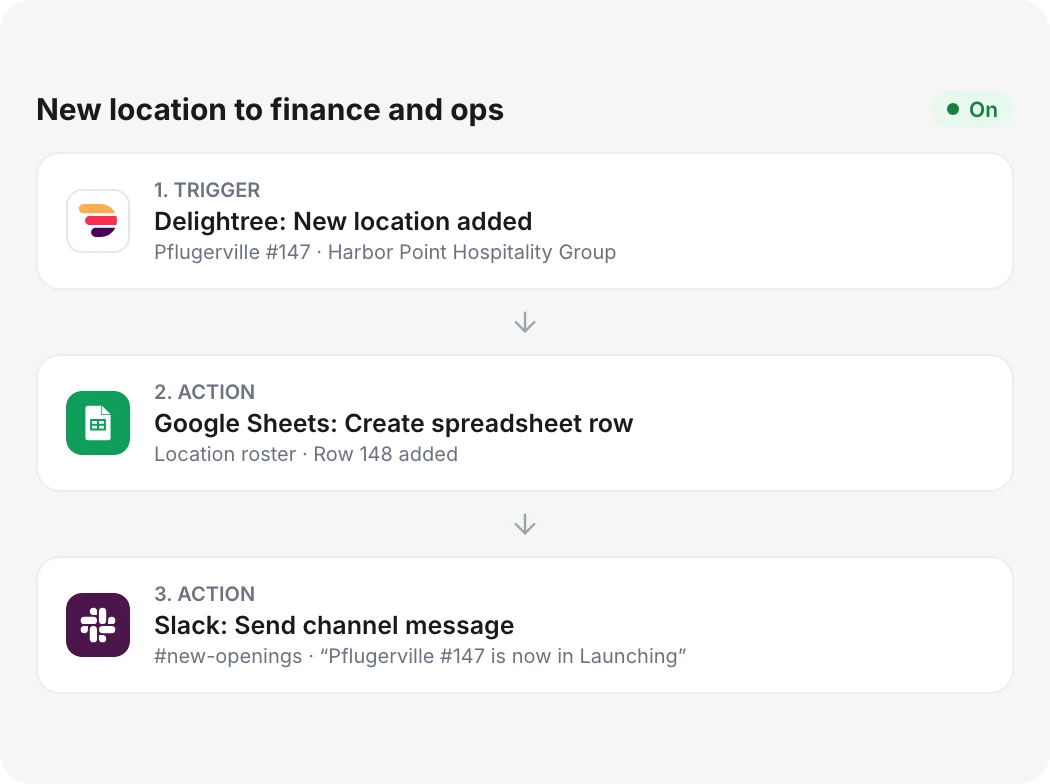
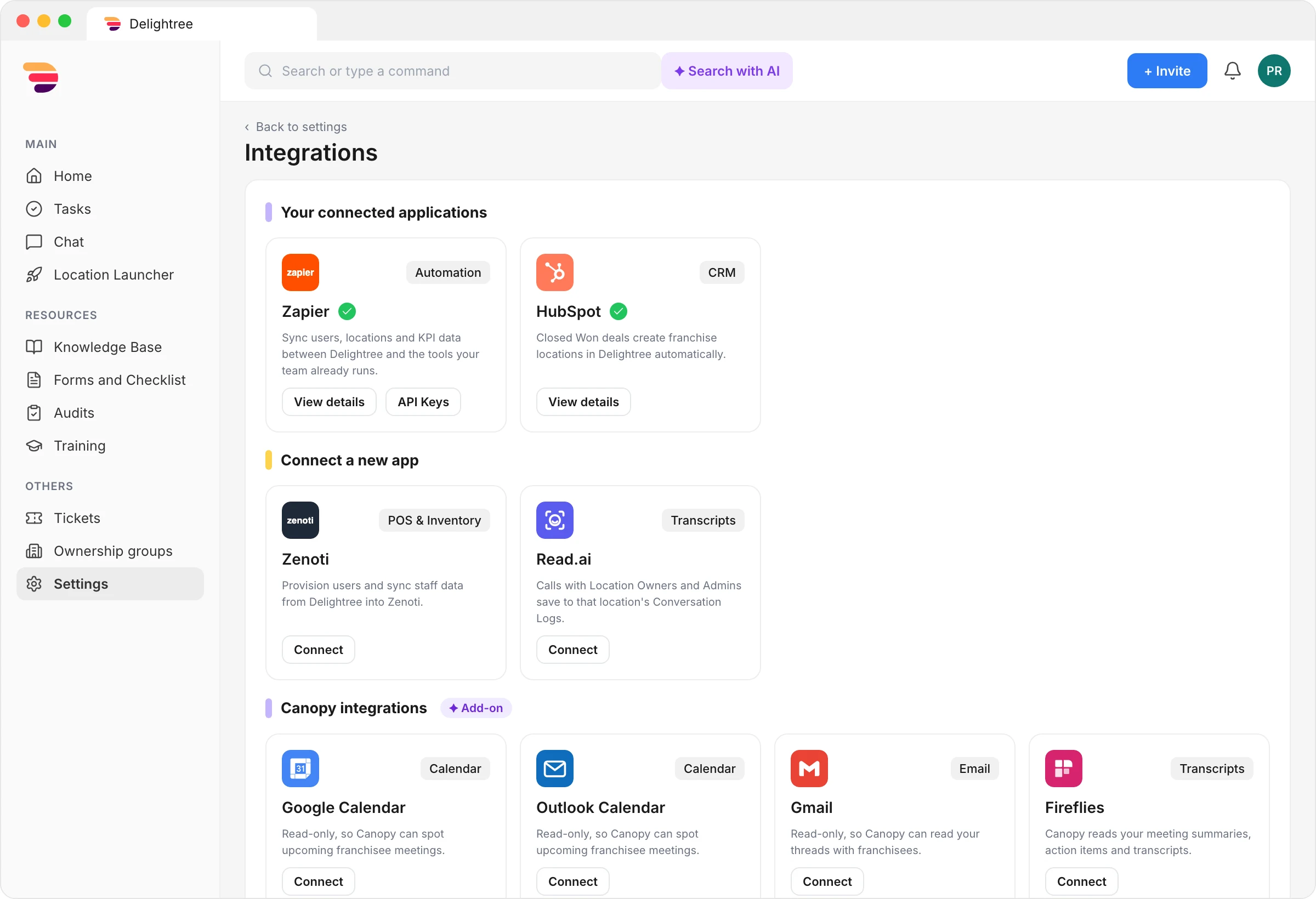
Connect Delightree to thousands of apps with Zapier
Delightree tells Zapier when someone creates, updates, archives, or deletes a user, and when someone adds a location or new KPI data is ready. Through Zapier, your other apps can update, archive, or delete Delightree users, so a user you archive in your HR platform gets archived in Delightree too.
- Two-way user sync
- No custom development
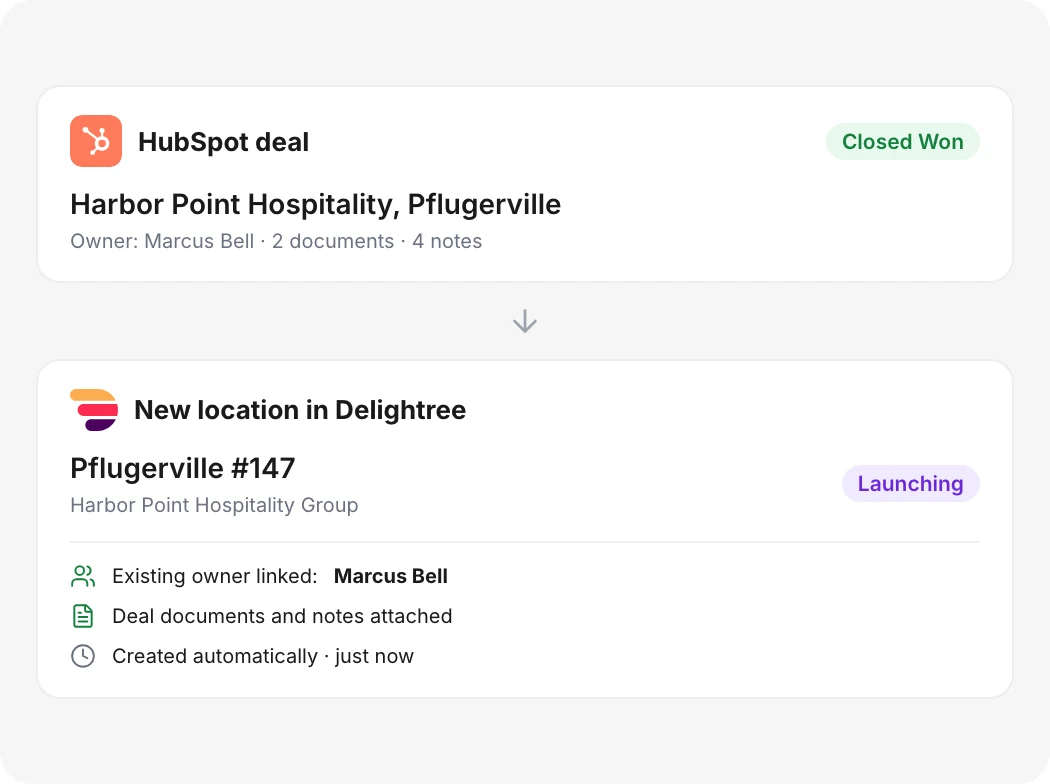
Turn closed deals into new locations
When someone on your team marks a HubSpot deal Closed Won, Delightree creates the location in Launching or Prelaunch status from the deal's documents and notes. Delightree also links any existing owners, so nobody re-enters the record.
- One-way sync from HubSpot
- Enabled by your CSM
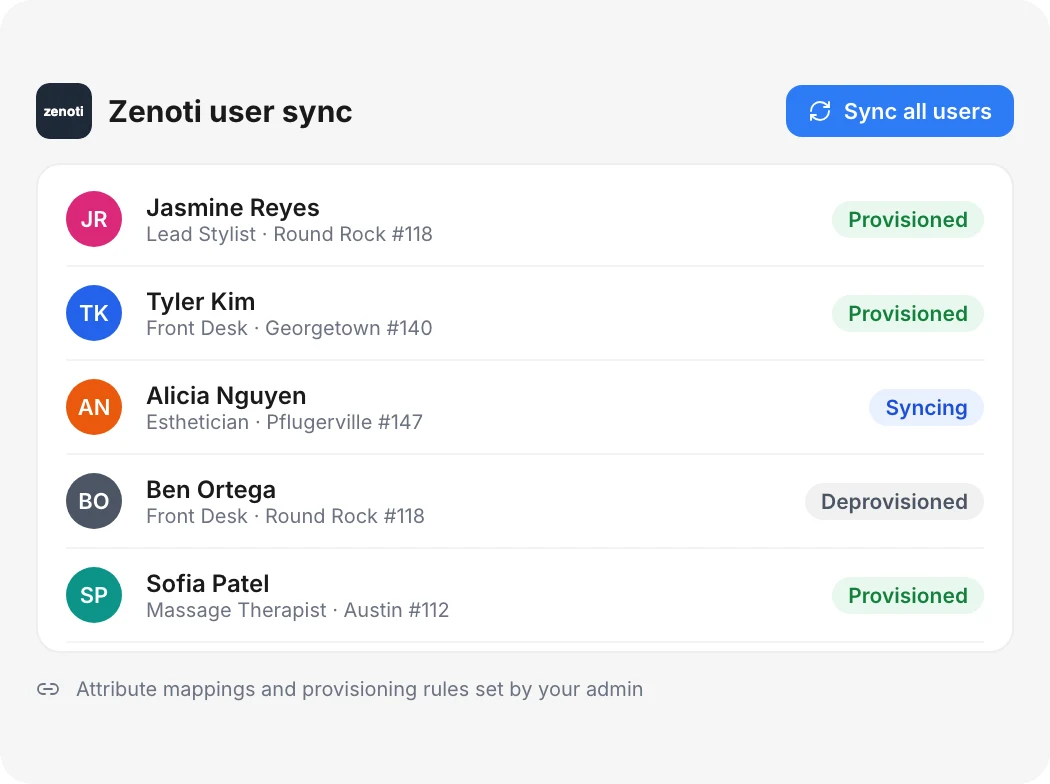
Add and remove Zenoti staff from Delightree
Admins connect Zenoti from the Delightree Marketplace and choose which user fields carry over and which provisioning rules apply. Delightree then creates Zenoti accounts for new staff and removes people who leave, in bulk or one at a time.
- Bulk or single-user sync
- Automatic removal when staff leave
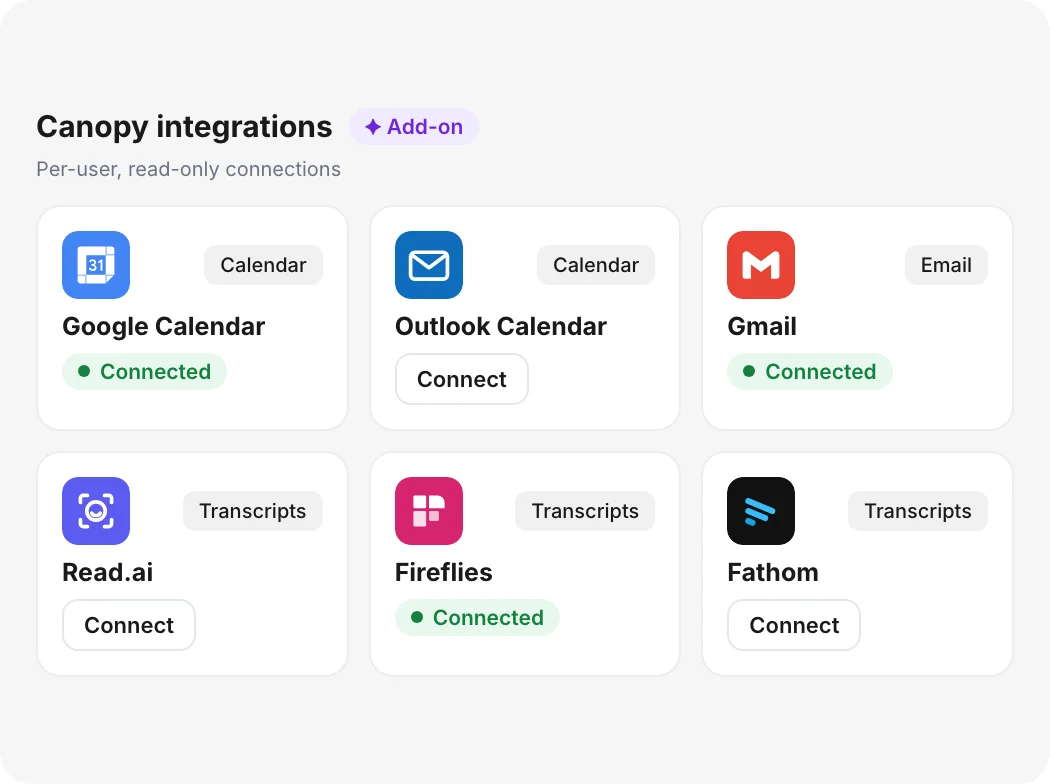
Connect meeting notes to Canopy
Each Canopy user connects their own calendar and inbox read-only, plus meeting notes from Read.ai, Fireflies, Fathom, or Google Meet. Canopy uses them to spot upcoming franchisee meetings and keep the meeting briefs it writes up to date.
- Per-user connections
- Read-only access
Delightree integrations
Your Customer Success Manager turns on HubSpot and QuickBooks for you.
Core integrations
 Automation
Zapier
Send Delightree user and location changes, plus KPI data, to thousands of apps such as Google Sheets and Power BI, and update Delightree users from them. Admins build the connections in Zapier with no custom code.
 CRM
CRMHubSpot
Delightree creates a location when your team marks a HubSpot deal Closed Won.
 POS & Inventory
Zenoti
Sync your Delightree staff list to Zenoti.
 Accounting
QuickBooks
Franchisees connect QuickBooks so HQ sees income, expenses, profit, and royalty fees by location.
 Transcripts
Read.ai
Delightree saves transcripts of calls with location owners and admins to that location's Conversation Logs.
Point of sale and payments
Delightree connects to the systems below through a third-party integration platform. Ask your Delightree team which records each connection brings in.
 Toast
Toast Square
 Clover
 Lightspeed Retail
 Shopify
 Stripe
Accounting and finance
 Xero
Xero NetSuite
 Sage Intacct
HR and payroll
 ADP
ADP Gusto
Gusto Paychex
 Paylocity
 Paycom
 Rippling
 BambooHR
 UKG
UKG Workday
Studio and field service software
 Mindbody
 Jobber
CRM and marketing
 Salesforce
 Pipedrive
 Mailchimp
 Klaviyo
 Podium
Files and e-signature
 Google Drive
 SharePoint
 OneDrive
 Dropbox
 Box
Box DocuSign
Data and reporting
 Power BI
 Tableau
 Snowflake
 BigQuery
 Google Sheets
 Microsoft Excel
Team communication
 Slack
Slack Microsoft Teams
Canopy integrations
Canopy add-onIncluded with the Canopy add-on. Each user connects their own accounts, read-only.
 Calendar
Google Calendar
Lets Canopy spot upcoming franchisee meetings.
 Calendar
Outlook Calendar
Lets Canopy spot upcoming franchisee meetings.
 Email
EmailGmail
Lets Canopy read your email threads with franchisees.
- Email
Outlook
Lets Canopy read your email threads with franchisees.
- Transcripts
Read.ai
Canopy reads your meeting summaries, action items, and transcripts.
 Transcripts
Fireflies
Canopy reads your meeting summaries, action items, and transcripts.
 Transcripts
Fathom
Canopy reads your meeting summaries, action items, and transcripts.
 Transcripts
Google Meet
Canopy reads your meeting notes and transcripts. Connect Google Calendar first.
What changes for your team
Franchisors who connect Delightree can:
Stop re-entering new users and locations
A user or location you add in Delightree reaches your other systems through Zapier.
Create locations from HubSpot deals
A deal your team marks Closed Won becomes a Launching or Prelaunch location in Delightree, with its documents and notes attached.
Remove access when people leave
When you archive or delete a user in Delightree, Zapier can pass the change to your other tools, and Delightree removes them from Zenoti.
Report from current numbers
KPI data reaches your BI tools as soon as Delightree has it.
What your team uses alongside integrations
- Location LauncherPhase-dependent launch playbooks that turn every opening into the same repeatable sequence, with training, SOPs, compliance gates, and real-time launch visibility.Learn more
- Dashboards & ReportingRole-scoped dashboards that show task completion, training, audits, and launch status in real time, with each role seeing exactly its slice of the hierarchy.Learn more
- Franchise Info CenterOne record for every franchise entity that holds its owners and locations next to its compliance documents. Approvers review uploads in the categories that require approval, and Delightree flags documents before they expire.Learn more
- Tasks & ChecklistsRecurring and one-off tasks and checklists that give the frontline clear work with context, and give HQ proof of execution across every location.Learn more
Integrations FAQ
What integrations does Delightree offer?
Delightree connects directly with POS and payroll systems such as Toast, Square, ADP, and Gusto, along with QuickBooks, HubSpot, Zenoti, and Mindbody. Zapier reaches thousands of other apps, and the Canopy add-on adds read-only calendar and email connections plus meeting-note tools.
What can the Zapier integration do?
Delightree sends user changes, new locations, and new KPI data to Zapier, and other apps can update, archive, or delete Delightree users through Zapier actions. Every user trigger sends complete data, including custom fields, so you can filter Zaps on any field.
Is two-way user sync available to every customer?
The user triggers and actions that support two-way sync are available to single-brand customers. Multi-brand networks can ask their Customer Success Manager about availability.
How do we turn on the HubSpot or QuickBooks integration?
Your Delightree Customer Success Manager enables both. HubSpot creates locations from Closed Won deals, and QuickBooks lets franchisees share financial metrics with HQ.
Do we need a developer to connect Delightree to other tools?
No. Admins authenticate Delightree in Zapier and build Zaps that map the fields they want to move, and the connection stays off until an admin sets it up.
What if a system we use isn't listed?
Ask your Delightree team. The third-party integration platform behind these connections supports hundreds of other business apps, and Zapier covers thousands more.
Which systems can we reach through Zapier?
Zapier connects to thousands of apps, including HR platforms, CRMs, spreadsheets, and BI tools such as Google Sheets, Salesforce, and Power BI.
Connect Delightree to your other systems
See how Delightree shares user and location changes with the tools you already use.