Keep every franchisee's entity records and compliance documents current, in one place
Delightree notifies you before a lease or insurance certificate expires, and your approvers review uploads in the categories you choose before anything posts.


![[solidcore] logo](/assets/customer-logos/solidcore-black-logo-logo.png)





Trusted by franchise and multi-location brands
One record for every franchise entity
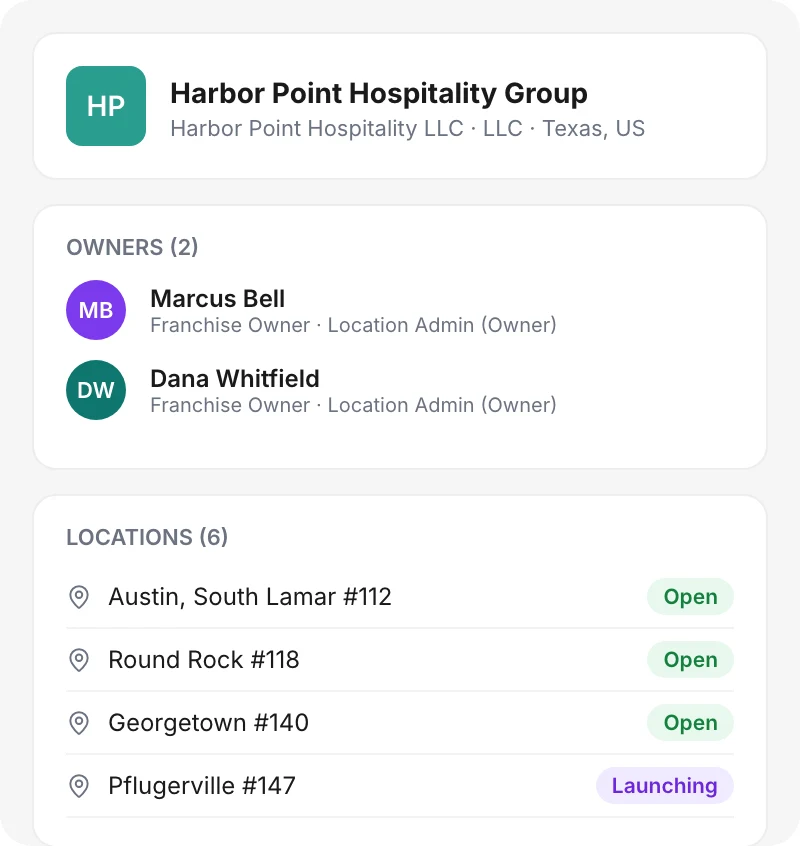
Each ownership group record in Delightree lists the legal entity and its owners, along with every location the group runs. You can attach a document to one location or to the whole entity, so a multi-unit operator's lease and insurance sit in one place.
Where franchisee paperwork goes missing
In the words of franchise operators who have tracked certificates and contracts by hand.
Certificates lost in email
“I have lost certificates within the mumbo jumbo that is my email. I have lost certificates before and had to have people resend them to me because they fall into the abyss... which is Gmail.”
Chasing insurance every year
“Every year I'm chasing insurance. Where has this been all my life?”
No idea where the licenses are
“I don't even know where they are, you know, the licensures for each location or the contracts for each location.”
Nobody knew the status after an owner died
“We had one of our owners die and nobody knew what the status was of their studios because this guy died with no will and no life insurance at all.”
Where franchisee compliance records break down
Franchisors who track this paperwork in email and spreadsheets find the missing and expired documents during an audit.
Expiry dates live in someone's head
A certificate of insurance or a health permit expires on a date nobody wrote down. HQ learns about it from an inspector or during an insurance claim.
Nobody reviews a document before it's filed
When franchisees email documents in, nobody checks that the file is signed and current before someone saves it to the shared drive. An unsigned or outdated file sits next to the valid ones, and nobody notices until an auditor asks for it.
Nobody sees a multi-unit owner's paperwork in one place
An operator with six locations has leases and permits for each one, spread across separate folders. HQ has to open each folder to answer one question about that operator.
How Franchise Info Center works
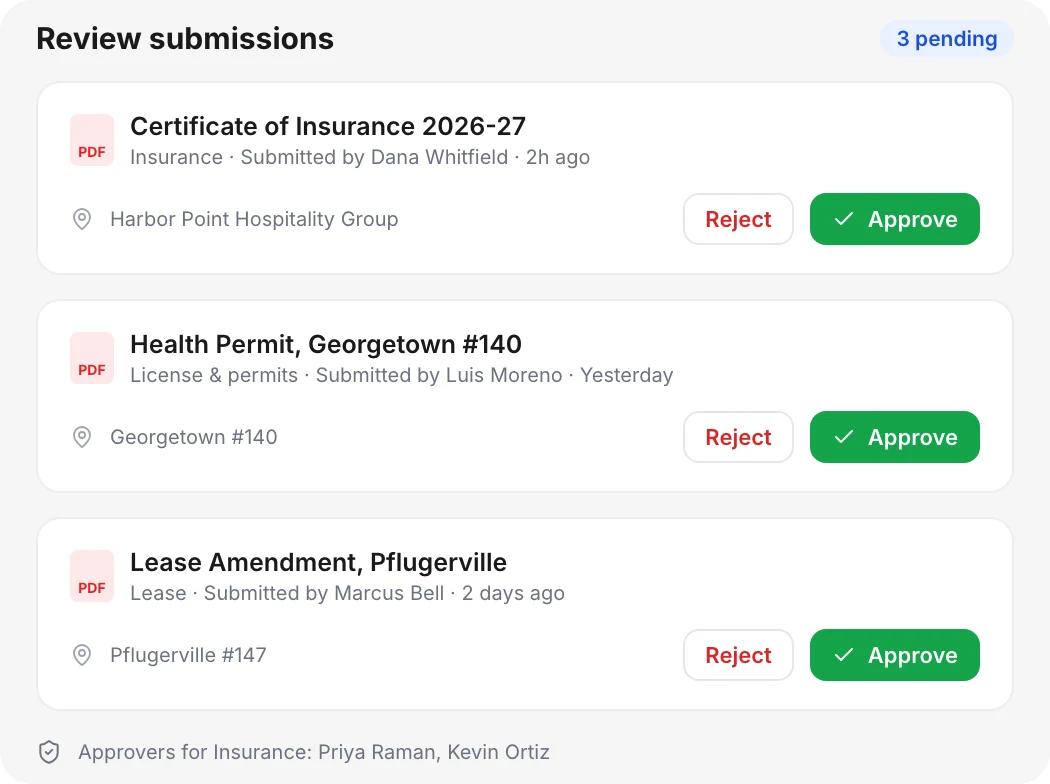
Approve documents before they go on file
Turn on Requires Approval for any document category and assign one or more approvers. Uploads in that category go to those approvers for review, and uploads in categories without approval go straight to the record.
- Approvers per category
- One queue to approve or reject
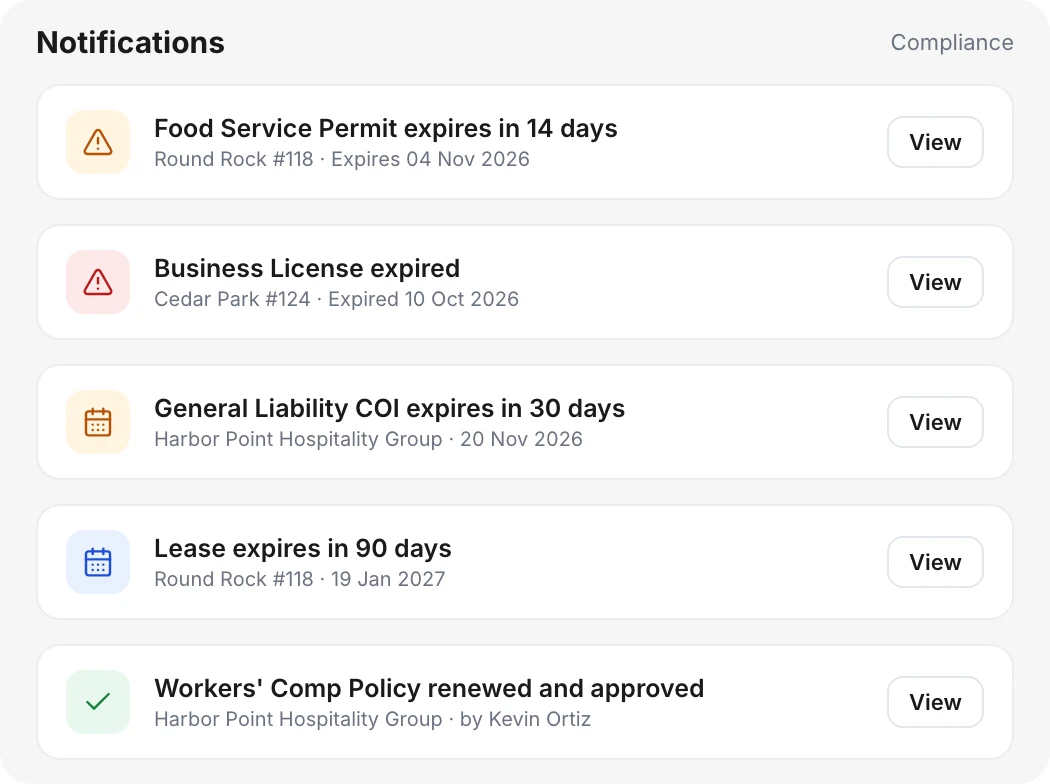
Get alerts before documents expire
Add an expiry date when a document goes in. Delightree sends a notification as the date approaches and again once it passes, and updates each location's compliance status on your dashboards.
- Expiry tracking on every document
- Real-time compliance status
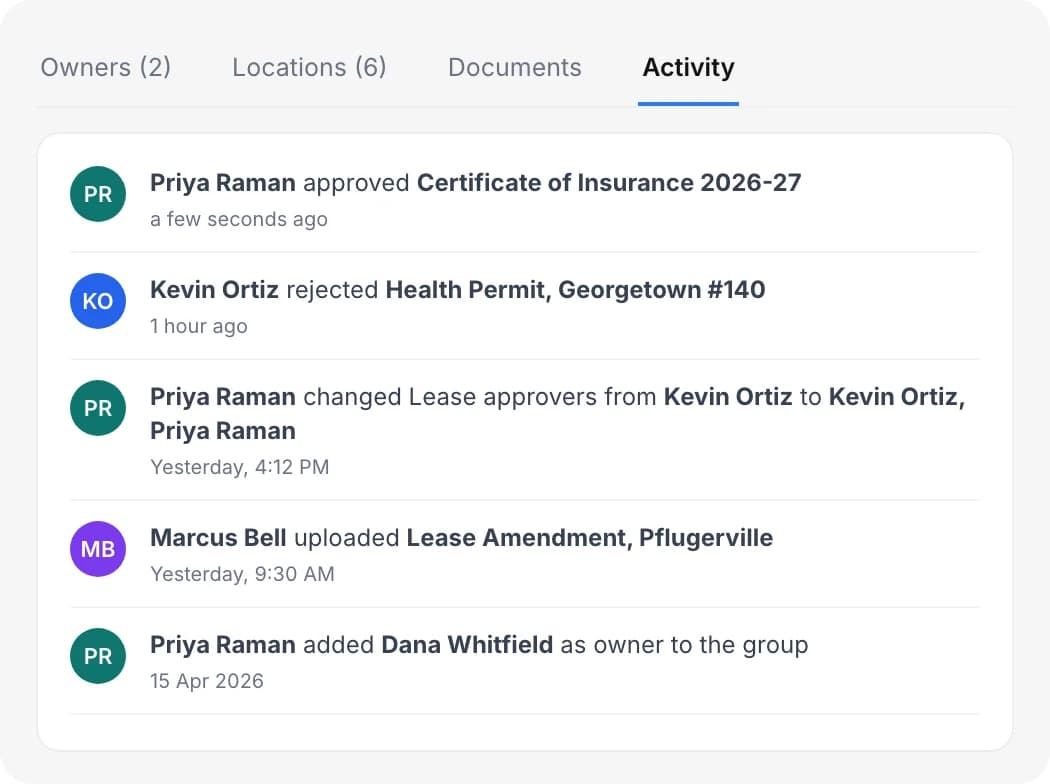
Keep a full audit trail
Delightree logs every upload, approval, rejection, and approver change with who made it and when. When an auditor or attorney asks for the history, the record already has it.
- Before and after values on every change
- Role-based access
What changes for your team
Franchisors using Franchise Info Center can:
Find any franchisee document from one search
Search and filter by category or location across every ownership group in the network.
Catch documents before they lapse
Your team can request a new certificate or permit before the old one runs out.
Know which locations are compliant right now
Delightree sets compliance status from which documents are on file and when they expire, so reports show each location's status as of today without a manual check.
Answer questions about any multi-unit operator from one screen
Pull up an operator's leases and insurance without opening a folder per location.
Keep entity details and compliance documents together.
Delightree stores each franchisee's certificates and permits next to their entity details.
What your team uses alongside Franchise Info Center
- Location LauncherPhase-dependent launch playbooks that turn every opening into the same repeatable sequence, with training, SOPs, compliance gates, and real-time launch visibility.Learn more
- Forms & ChecklistsDigital forms and checklists that franchisees complete on any device, with real-time tracking of who has submitted and cloud storage so records are easy to retrieve for audits.Learn more
- Audits & Site VisitsMobile-first audits and site visits. Each finding becomes a tracked corrective task that can trigger retraining and is verified to resolution.Learn more
- Dashboards & ReportingRole-scoped dashboards that show task completion, training, audits, and launch status in real time, with each role seeing exactly its slice of the hierarchy.Learn more
Franchise Info Center FAQ
What is Franchise Info Center?
Franchise Info Center is where franchisors keep franchisee entity information and compliance documents in Delightree. In the product it appears as Ownership Groups, with one record per franchise entity.
Which documents can we store?
Any document you create a category for. Franchisors commonly track leases, FDD receipts, franchise agreements, insurance certificates, business licenses, and health permits.
Who approves documents?
Franchisor admins pick one or more approvers for each category that requires approval. Submissions in that category route to those approvers, and Delightree logs every approval and rejection.
How do expiry alerts work?
When a document has an expiry date, Delightree sends notifications as the date approaches and after it passes. Compliance status updates automatically, so dashboards and reports reflect it.
Can one document cover more than one location?
Yes. Each document is scoped to a location, a location group such as a region, or a whole ownership group, so one insurance policy can cover every location a multi-unit operator runs.
Can franchisees keep documents private from HQ?
Location admins can upload documents marked visible to location admins only. Those skip approval and stay hidden from the franchisor, which suits routine paperwork that only matters to that location.
Who can see these documents?
Each user can view, upload, approve, or manage documents only when their role and location assignments allow it.
Put every franchisee record in one place
See how Franchise Info Center tracks entity records and expiring documents across your network.