
Skip to content
Best-Of GuideUpdated

12 Best Franchise Management Software Platforms in 2026

We evaluated 12 franchise management platforms on franchisee adoption, operational breadth, integration depth, location openings, compliance, and pricing model. Delightree is the best overall for location-level execution. FranConnect remains the strongest option for enterprise franchise development and royalties, BrandWide is the best value on the development side, and Operandio is the most complete multi-site operations platform.

  1. Best Overall

    Delightree

  2. Best for Franchise Development

    FranConnect

  3. Best Value for Franchise Development

    BrandWide

  4. Best for Multi-Site Operations

    Operandio

Joseph Ortega

Written by Joseph Ortega, Digital Growth Marketing Lead at Delightree

Before Delightree, he worked in franchise marketing at CorePower Yoga, Sola Salon Studios, and Fortidia's PostNet and AlphaGraphics brands, where he worked closely with operations teams to support large franchisee networks and keep every location on brand.

LinkedInPublished Updated

You already wrote the playbook. You have an operations manual, a brand standards document, an opening checklist, and a training curriculum that took months to build.

The problem is that location 14 is running v1 while corporate is on v3, the opening in Toledo got pushed back by two weeks before anyone at headquarters noticed, and the audit finding from last quarter’s field visit is still sitting in a PDF.

Most franchisors have already bought something meant to fix this. Then the franchisees stopped opening it, and HQ went back to flying blind. That is the real evaluation problem in franchise management software. The issue isn’t missing features. It’s getting people to actually use the software.

This guide compares the 12 platforms franchisors typically shortlist, scored against six weighted criteria drawn from what ops leaders raise in vendor evaluations, including whether the frontline uses it, how much of the operating day it covers, what it connects to, whether it can run a location opening, whether compliance closes, and what happens to the bill as the network grows.

This category is made up of two very different types of products. Franchise development suites own franchise sales, royalty calculation, and FDD workflows. Location execution platforms own SOPs, training, tasks, audits, and openings.

Buying the wrong half is an expensive mistake, and several platforms are excellent at one and absent when it comes to the other. The guide helps outline which is which.

Quick Comparison Table

  1. #1 Delightree

    Best Overall

    9.3/10

    Key Features
    Audit findings close to verified fixes
    Setup
    Months typically, weeks if simple
    Price
    Per location, unlimited users
  2. #2 FranConnect

    Best for Franchise Development

    7.5/10

    Key Features
    Widest franchise life cycle coverage
    Setup
    Months, project team
    Price
    Per module, custom quote
  3. #3 BrandWide

    Best Value for Franchise Development

    6.9/10

    Key Features
    Full life cycle at a lower entry point
    Setup
    Weeks to months
    Price
    Custom quote
  4. #4 Jolt

    Best for Food Safety Hardware

    6.3/10

    Key Features
    Labels, probes and temperature sensors
    Setup
    Weeks
    Price
    Per location
  5. #5 Operandio

    Best for Multi-Site Operations

    6.8/10

    Key Features
    Food safety and task discipline
    Setup
    Weeks
    Price
    Per user and module
  6. #6 Crunchtime Ops Execution

    Best for Enterprise Chains

    6.7/10

    Key Features
    Rollout control at scale
    Setup
    Months
    Price
    Custom, form- and tier-based
  7. #7 FranchiseSoft

    Best for Sales and Royalties

    6.5/10

    Key Features
    Franchise CRM and royalty tracking
    Setup
    Weeks of module training
    Price
    Per user plus modules
  8. #8 Xenia

    Best for Facilities and Maintenance

    6.4/10

    Key Features
    Work orders and inspections
    Setup
    Days to weeks
    Price
    Per user or per site
  9. #9 ClientTether

    Best for Franchise Sales Automation

    6.0/10

    Key Features
    Speed-to-lead automation
    Setup
    Days to weeks
    Price
    Custom quote
  10. #10 Connecteam

    Best for Frontline Communication

    5.7/10

    Key Features
    Scheduling, chat, time tracking
    Setup
    Days
    Price
    Per user, tiered by seat count
  11. #11 FieldPulse

    Best for Home Services Franchises

    5.4/10

    Key Features
    Dispatch, quoting, invoicing
    Setup
    Days to weeks
    Price
    Base plus per user plus add-ons
  12. #12 Trainual

    Best for SOP Documentation

    4.7/10

    Key Features
    Process documentation and onboarding
    Setup
    Days
    Price
    Per headcount band

Data current as of August 2026.

One removal is worth flagging. Naranga appeared in earlier versions of this guide and has been removed because the company has wound down its software operations. The naranga.com domain is no longer active and company trackers record the business as closed. Former Naranga customers evaluating a replacement should look at BrandWide, FranchiseSoft and ClientTether for the franchise development and royalty side, and at Delightree for location execution.

How We Evaluated These Franchise Management Platforms

We assessed 12 platforms in August 2026 using published pricing and product documentation, verified review data on G2 and Capterra, hands-on product tours where available, and the questions franchisors actually ask during vendor evaluations.

The weightings are based on what ops leaders raise in those evaluations, not on any one platform’s feature list. Adoption carries the heaviest weight because it is the most common reason for a franchise software purchase to fail. The pricing model carries the least weight because every vendor listed here is affordable relative to the cost of a delayed opening or a failed inspection.

Our Scoring Methodology

  1. Franchisee and Frontline Adoption25%

    Whether the person in the location opens it. Mobile experience, login friction, role scoping, and whether HQ can see who is not using it.

  2. Operational Breadth in One System20%

    How much of the operating day lives in one place: SOPs, training, tasks, audits, communications, reporting.

  3. Integration Depth15%

    Native connections to POS, booking, HRIS, payroll, and accounting, versus Zapier, versus no integration.

  4. Location Opening and Rollout15%

    Whether the platform can run a phased opening program, and what happens to the location after go-live.

  5. Compliance and Audit Trail15%

    Scored audits, corrective actions, retraining triggers, and a record that survives a regulator or a franchise attorney.

  6. Pricing Model and Transparency10%

    Published pricing, what is gated, and what happens to the bill as locations and headcount grow.

The 12 Best Franchise Management Software Platforms in 2026

Our Top Pick
Ranked #1

Delightree

Best Overall

Franchise Ops Score: 9.3/10

Delightree is the franchise operations platform behind 150+ franchise brands, including Tony Roma’s, L&L Hawaiian Barbecue, Clean Eatz, Sandbox VR, and Slick City. It replaces the learning management system, the task manager, the audit app, the communications channel, and the SOP folder with a single mobile-first system that covers Knowledge Base and SOPs, training and onboarding, tasks and checklists, site visits, Location Launcher, communications, dashboards, support tickets, and forms on a single data layer. It is built around a single argument: If the person in the location does not open it, nothing else about the platform matters.

Best for: emerging and mid-size multi-unit franchise brands, roughly 10 to 300 locations, that need franchisees and frontline teams to actually adopt one system.
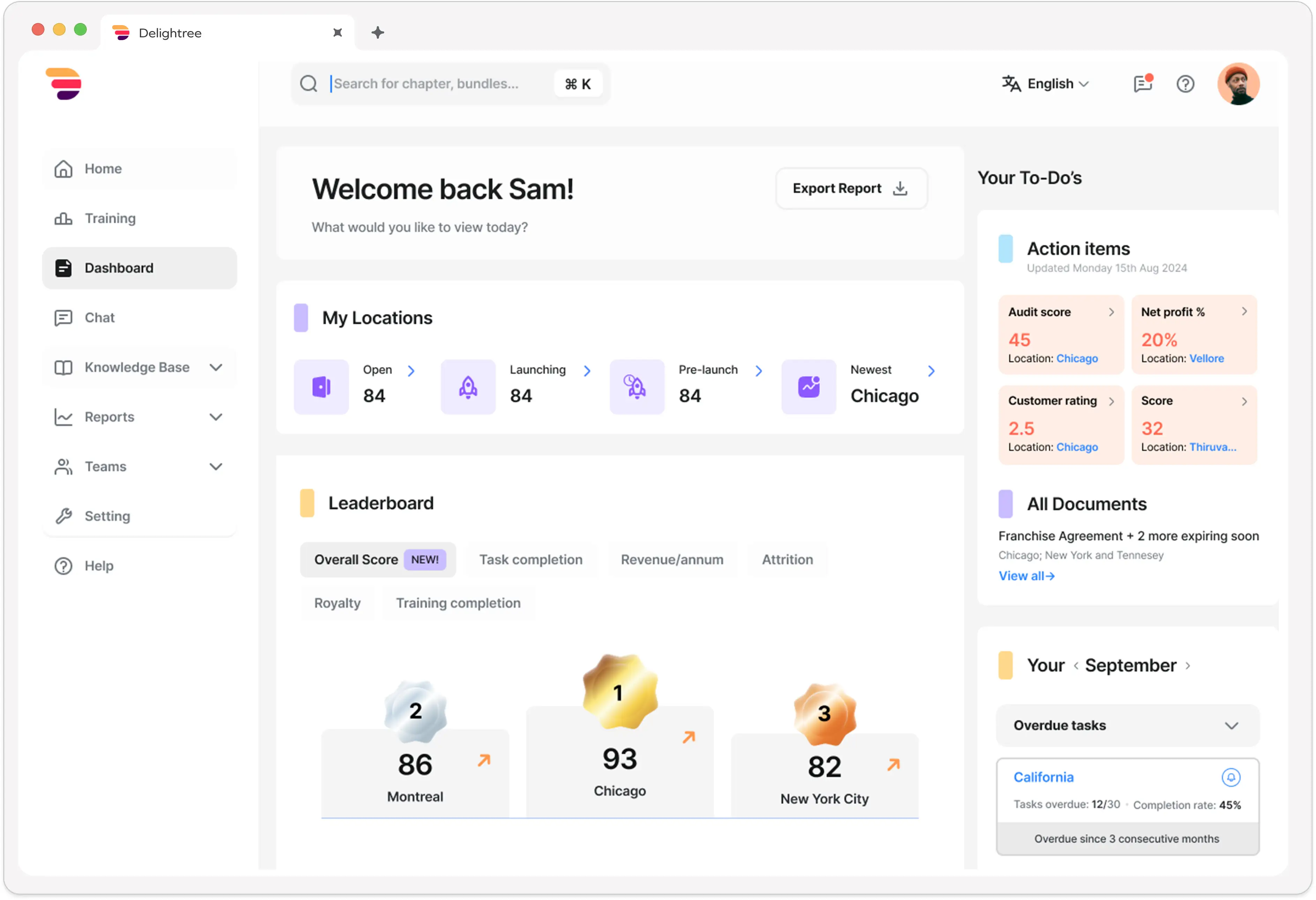
Delightree location dashboard

Product Overview

  1. Pain: A location fails an audit item, but the fix has to be made in a different tool

    Your field manager scores a visit, flags a walk-in temperature log, and the finding lands in a report. The corrective action is typed into a task app, the retraining is requested from whoever owns the LMS, and the re-check depends on someone remembering. Three systems, two exports, and no single record that the problem was actually solved.

    Solution: The finding becomes a corrective task, and retraining is assigned from the same screen

    In Delightree, a failed audit item becomes a corrective action task with an owner and a deadline. From the audit screen, the franchisor can assign the relevant training module to that location’s team, raise a support ticket if the cause is equipment or supply, and trigger a follow-up visit to verify the fix. Nothing gets exported to another tool. The brand standard the location failed on lives in the same Knowledge Base the training is built from, so when the standard is updated, the audit criteria and the course reference stay current from one source. That connection between finding, task, retraining and re-verification is what most of the category leaves to an individual and a spreadsheet.
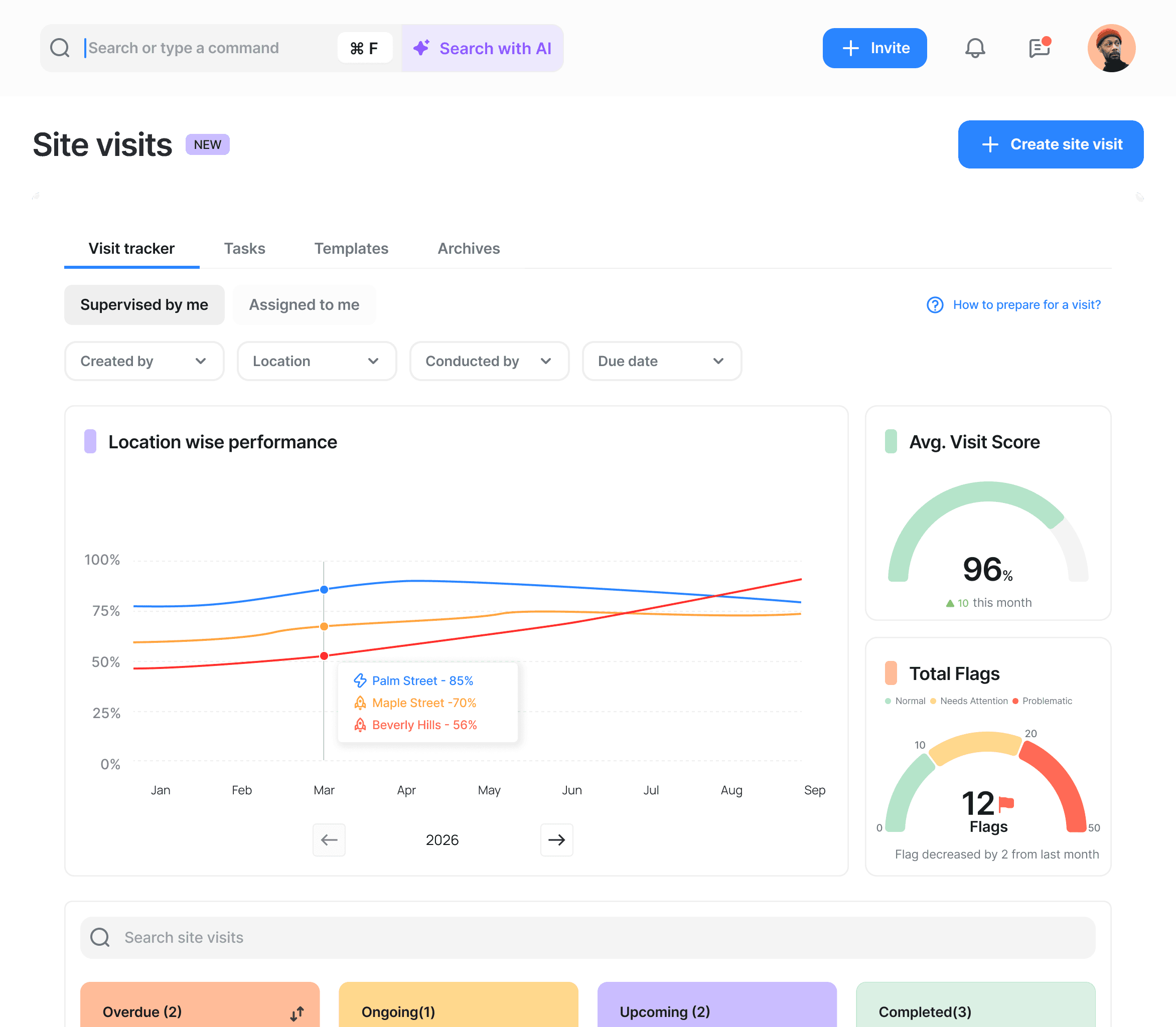
    An audit finding creating a corrective task in Delightree
  2. Pain: Franchisees are running last quarter’s version of the ops manual

    Version control is where consistency breaks down. HQ publishes v2 of a procedure, the update lands in email and a group chat, and six months later, a field visit turns up three locations still using v1. Nobody was negligent. The update just had no way to reach the shift.

    Solution: One knowledge base with version control and read receipts by location

    Every SOP, policy, and brand standard lives in one place. When HQ publishes once, the change propagates to every training module and checklist that references it, and communications carry acknowledgment tracking so you can see who read the update and who did not.
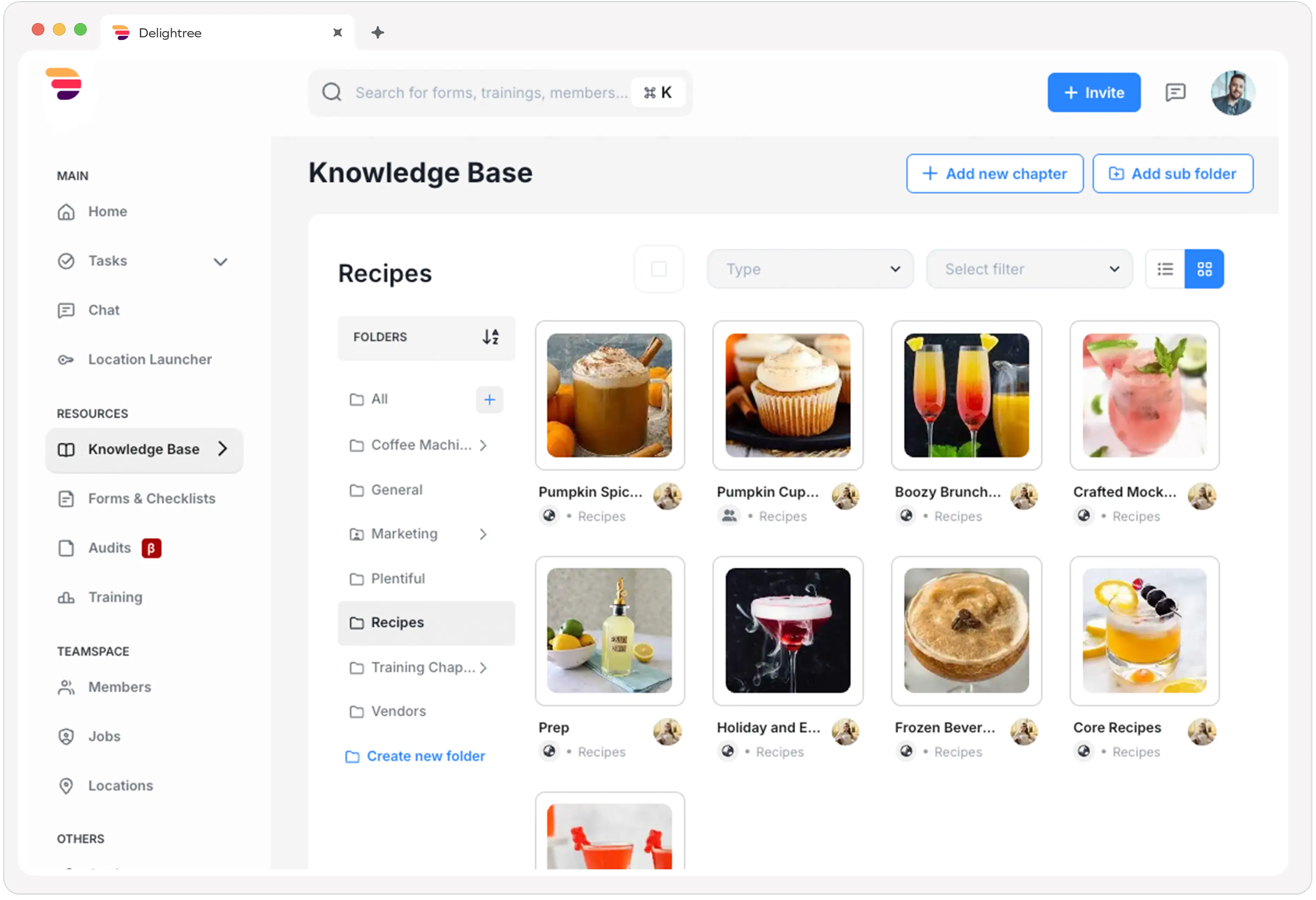
    Delightree knowledge base with version control and read receipts
  3. Pain: An opening gets pushed back and nobody notices it until the date changes

    Openings are tracked in a shared spreadsheet that is accurate on Monday but stale by Thursday. The status call surfaces problems a week after they started. A delayed opening costs thousands of dollars per week in unearned royalties.

    Solution: A phase-gated opening program that unlocks the next stage on completion

    Location Launcher turns each opening into a phase-dependent playbook, with built-in training, SOPs, and compliance gates. The next phase opens only when the opening team finishes the current one, and the location keeps using the same platform after launch. Tony Roma’s replaced weekly spreadsheets and status calls with real-time launch visibility.
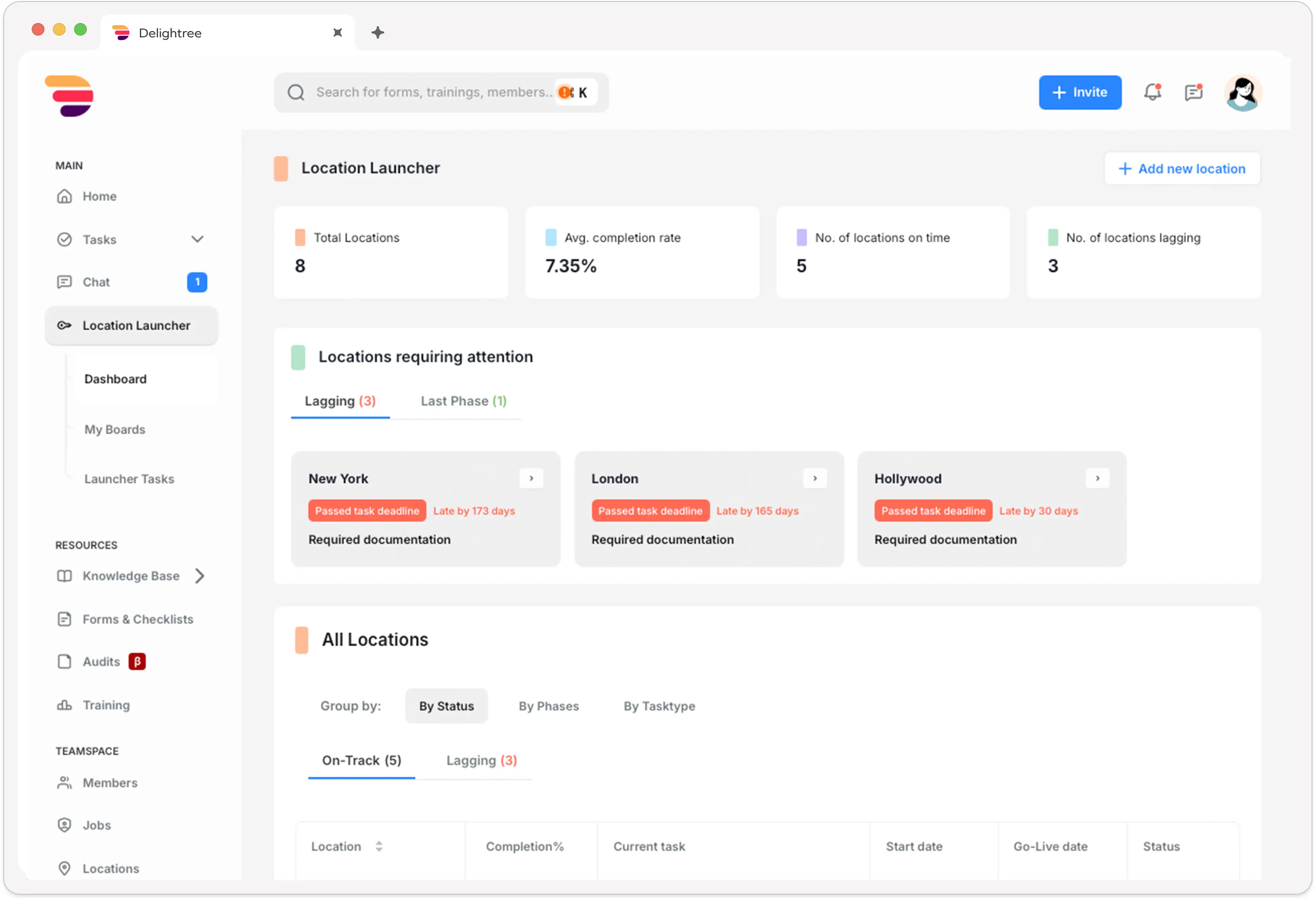
    Delightree Location Launcher phase gates

Interactive Product Demo

About 3 minutes, no form. Open the full tour

Pricing

Flat rate per location with unlimited users. Every HQ and corporate seat is included, and adding people never incurs additional cost, removing the incentive to ration logins that quietly kills adoption on per-seat platforms. Delightree does not publish list prices and quotes each network individually. Three factors drive the quote: the number of locations, the length of the agreement, and your planned growth. Ask for it to be modeled at your current location count and at your three-year count.

Integrations

Delightree integrates natively with Zapier, QuickBooks, HubSpot, and Zenoti for wellness and beauty points of sale. Zapier covers the long tail of systems without a native connector. If your stack depends on a POS, human resources information system or payroll system outside that list, name it during evaluation and get the answer in writing, because integration coverage is the most common late-stage surprise in this category.

Setup

Most franchise rollouts are measured in months, not weeks. A smaller, less complex network with an HQ team that stays responsive through onboarding can go live in weeks, but that is the exception.Network size and complexity drive the timeline more than anything else.

You do not start from zero. Existing SOPs, training content and location structure come into Delightree during onboarding, handled by Delightree’s own Customer Success team. Delightree publishes a 30-day rollout framework built around early activation milestones, daily rather than weekly usage monitoring, and identifying who has not logged in within 48 hours.

Tradeoffs

Delightree is not a franchise development suite. It does not run franchise sales CRM, royalty calculation and collection, or FDD and legal document management.A brand that needs development and royalties in the same system as operations should look at FranConnect or BrandWide and accept the interface, pricing, and implementation tradeoffs that come with them.

It does not replace a POS, a booking platform, or payroll.

Support

Every network gets white-glove onboarding and a dedicated account manager, and that account manager stays with you as you add locations and onboard new franchisees.

Erin Render, CEO of Legato Living, described onboarding as "a breeze due to the support of the Customer Success team," adding that it "wasn’t a matter of overselling and under-delivering like we’ve experienced in the past."

Mini Case Study

Slick City replaced five separate tools with one system and built a repeatable opening process as it scaled past 32 territories.

“Having documented daily checks that are completed and cleaning tasks that are documented has been a game changer. We can audit what’s been done or not been done, and from a risk standpoint, it’s been critical.”
Wade Powell, Chief Operating Officer, Slick City
Read the full case study

See how Delightree helps multi-location teams run their day-to-day operations. Try the workflow yourself without filling out a form, or book a demo tailored to how your brand operates.

Book a Demo
Ranked #2

FranConnect

Best for Franchise Development

Franchise Ops Score: 7.5/10

FranConnect is the incumbent in franchise software and has been for over two decades, serving 1,500+ franchise and multi-location brands across franchise sales, royalty management, field operations, and training through World Manager. If your evaluation includes franchise development and royalty collection, FranConnect belongs on the shortlist and probably wins that part of the comparison.

Product Overview

FranConnect covers the full franchise life cycle, including a franchise sales CRM with Item 23 receipt handling, franchisee onboarding, royalty calculation and collection, FDD and compliance document management, field visit and audit modules, an opener module for new locations, and World Manager as an embedded training platform.

Nothing else in this guide covers that much of a franchisor’s back office. The tradeoff is that the modules are separate products sharing a login rather than one connected system, so data does not always move between them the way.

Pricing

Custom quote, priced by module and system size. No published list price and no free tier. Because pricing is modular, the number you are quoted depends heavily on which parts you take, which makes like-for-like comparison against a single-price platform difficult. Get the module list in writing with prices and exclusions before you compare.

Integrations

Broad and enterprise-grade, with an API and connections across POS, accounting, and marketing systems. This is a genuine strength relative to most of the category.

Setup

Months, and typically requires a dedicated project team on your side. Implementation is the most commonly cited friction point for FranConnect, and it should be scoped as a project rather than a rollout.

Tradeoffs

Frontline adoption is the recurring complaint, and the review base points at usability as the cause. Reviewers describe software that is clunky and overly complicated, and difficult enough for frontline staff to navigate that they stop opening it. One customer described FranConnect’s field-communication side as "a graveyard, nobody logs in."

FranConnect holds 4.3 from 209 reviews on Capterra, with ease of use at 4.2 and value for money at 4.2, both below its customer service score of 4.5. The audit loop also stops short. Findings can create a task, but the retraining and verification live in a separate module, so the loop ends at task creation, not a verified fix. World Manager is a FranConnect product, a noteworthy detail if you are evaluating them as two options.

Ranked #3

BrandWide

Best Value for Franchise Development

Franchise Ops Score: 6.9/10

BrandWide covers the full franchise life cycle at a lower entry point than FranConnect, and it is a U.S. supplier member of the International Franchise Association, which carries weight with buyers who use IFA membership as a shortlisting filter. It targets emerging and mid-sized franchise systems that want development, operations and franchisee support from one vendor.

Product Overview

Franchise development with AI-assisted sales outreach for recruiting franchisees, onboarding with checklists and project tracking, a built-in LMS for training, royalty management with automation for complex royalty scenarios, compliance tracking, audits, and day-to-day operations. The dual focus is deliberate. Franchisors get network visibility while franchisees get local marketing and CRM tools of their own, which helps the advisory council conversation.

Pricing

Custom quote, not publicly listed. Third-party sources report an entry point around $50 per month, though that figure predates the current product and should not be treated as the real number for a multi-location brand. Confirm current tiers directly.

Integrations

Moderate. Adequate for marketing and CRM workflows, thinner on the operational stack. Verify POS, booking, HRIS and payroll against your actual systems in writing.

Setup

Weeks to months, with managed implementation and 24/7 support offered as a differentiator. The breadth of the feature set carries a learning curve, and adopting it well takes a real effort.

Tradeoffs

BrandWide holds 5.0 from 27 reviews on Capterra, which is an excellent rating on a thin review base. Though 27 reviews is not enough to reveal the failure patterns a larger base would surface, weight reference calls at your own size accordingly. Pricing is not publicly listed, which is a barrier at the research stage. The same structural limitation as FranConnect applies to the audit loop. Findings and tasks exist, but retraining and verification are in a separate module, so the loop does not close inside one system.

Ranked #4

Jolt

Best for Food Safety Hardware

Franchise Ops Score: 6.3/10

Jolt is a tablet and mobile operations platform for restaurants and food service, used by over 300,000 workers globally with more than 700 million tasks completed on the platform. Clients include McDonald’s, Smoothie King, Jimmy John’s and Buffalo Wild Wings. On food safety mechanics specifically, it is the most hardware-native tool in this guide.

Product Overview

Recurring checklists, opening and closing routines, digital food safety logs, date labeling, wireless temperature probes and sensors with alerting, forms, and time and attendance. The hardware is the real differentiator. Temperature capture is passive rather than dependent on somebody remembering to take a reading and write it down.

Pricing

Per location, quote-based, with no published list price and no free trial listed. Hardware for labeling and temperature sensors is a separate cost and should be scoped per location. Confirm current pricing directly.

Integrations

Integrates with common POS and scheduling tools, plus its own label printer and probe hardware ecosystem.

Setup

Weeks. Most operators find the interface simple enough for hourly staff with minimal guidance, though configuring templates across many locations takes a meaningful initial time investment.

Tradeoffs

Jolt holds 4.4 from 116 reviews on G2 and 4.6 on Capterra, with 53% of G2 reviewers at mid-market scale. There are recurring service complaints in the review base, including a Capterra reviewer citing false promises and poor service. Structurally, it is checklists and food safety only. No franchise hierarchy, no integrated training, no location opening program, and no corrective action loop that reaches retraining. A brand needing accountability beyond “done” or “not done” outgrows it.

Ranked #5

Operandio

Best for Multi-Site Operations

Franchise Ops Score: 6.8/10

Operandio is a digital workplace platform for deskless and frontline teams, strongest in restaurant, hospitality, and food-adjacent multi-unit operations. If your problem is daily task discipline and food safety (as opposed to the full franchise life cycle), it’s a strong competitor and does the job well.

Product Overview

Digital checklists and daily task management, food safety workflows including temperature logs, inspections and audits with corrective action routing, employee communications, and a searchable knowledge base. Operandio also runs a mobile-first LMS with quizzes, badges, pathways, certificates and an AI course builder, a Location LaunchPad for new location openings, supplier management, and FranchiseLab for franchisee recruitment. Calling it a checklist app understates it substantially.

Pricing

Priced by a combination of locations, users, and modules, with quotes rather than published tiers. The per-user component is the thing to model, because a high-turnover hourly workforce is exactly the scenario that will end up costing you.

Integrations

Moderate. Adequate for the restaurant stack, thinner elsewhere. Check HRIS and payroll specifically if roster sync matters to you.

Setup

Weeks. Reviewers describe it as approachable for non-technical users, with a reasonable onboarding path.

Tradeoffs

Operandio has 4.9 stars from 22 reviews on Capterra, a strong score on a thin base, so reference calls at your own size carry more weight than the score alone. The most consistent critique is reporting maturity. The analytics and dashboard layer is less developed than the task and inspection layers it reports on. Its hospitality and food center of gravity means nonfood franchises hit restaurant assumptions in the product. Because it also serves corporate chains, hotels and gyms, its franchisor-to-franchisee tooling is less specific than a franchise-first platform’s. It does not route franchisee support tickets to the responsible person at franchisor HQ.

Ranked #6

Crunchtime Ops Execution

Best for Enterprise Chains

Franchise Ops Score: 6.7/10

Crunchtime Ops Execution is the platform formerly known as Zenput, acquired by Crunchtime in 2022. It supports over 150,000 locations across more than 100 countries, with brands including Chipotle, P.F. Chang’s, and large Taco Bell franchisees. For enterprise restaurant and convenience networks that need above-location teams to push programs and verify execution, it is the most widely deployed tool in the category.

Product Overview

Operational program rollout at scale, recurring task assignment, food safety routines and line checks, location audits with scoring, and execution visibility by region and location. It works best inside the broader Crunchtime suite, where it works alongside inventory and labor forecasting, which is also the point at which the commitment gets heavy.

Pricing

Custom quote only, with a tier and form-count model. Third-party sources report a starting point around $40 per month per location, but real pricing depends on locations, form counts, and requirements. The form-count element is the one to model. More locations means more forms, which means a higher tier.

Integrations

Deep within the restaurant stack, particularly across the Crunchtime suite. Strong POS coverage.

Setup

Months, with the longest sales cycle of anything in this guide. This is enterprise software sold through a demo and a procurement process.

Tradeoffs

Since the Crunchtime acquisition, reviewers have mentioned roadmap direction, request handling delays, and product update pace. The pricing model penalizes growth rather than rewarding it. There is no location opening program, so new locations still get tracked by hand. Built for corporate chains and not n franchise structures, so franchisor-to-franchisee permissioning gets configured, not modeled natively. Substantially heavier than a network below roughly 20 locations needs. If you are searching for Zenput, this is where it went.

Ranked #7

FranchiseSoft

Best for Sales and Royalties

Franchise Ops Score: 6.5/10

FranchiseSoft is a franchise management suite covering the full life cycle from franchise sales through ongoing operations, aimed at emerging and mid-market franchisors. It is a reasonable value option for brands under 10 units whose priority is the development side.

Product Overview

Franchise sales CRM and lead management, franchisee onboarding, royalty calculation and reporting, field audits, document management, and support ticketing, all from a single login. The pitch is consolidation of the franchisor back office, and for the development half of that, it is credible.

Pricing

Per user with module charges. That structure is the thing to model carefully. Every franchisee and hourly employee you want in the system increases the bill, which quietly discourages the broad access that adoption depends on.

Integrations

Moderate. Verify against your POS, booking, HRIS, and payroll stack in writing.

Setup

Weeks of training across multiple modules before frontline teams are productive, which is a meaningful cost when your frontline turns over several times a year.

Tradeoffs

The most significant issue is verifiability. FranchiseSoft markets 60,000+ registered franchisors and franchisees, yet carries no verified reviews on G2, Capterra, Software Advice, or SoftwareSuggest, which means every testimonial available to you originates from the vendor’s own website. For a purchase this consequential, insist on reference calls at your own size. Beyond that, per-user pricing works against frontline access, and there is no phase-gated opening program or corrective-action loop connecting findings to retraining.

Ranked #8

Xenia

Best for Facilities and Maintenance

Franchise Ops Score: 6.4/10

Xenia is an operations and maintenance platform for deskless teams, covering inspections, checklists, work orders, and asset management. It is the strongest option here for franchise networks where the physical matters as much as the process, including equipment-heavy fitness studios, car washes, or restaurants with significant kitchen assets.

Product Overview

Inspections and audits with photo evidence, recurring task scheduling, work order management, preventive maintenance and asset tracking, and issue reporting with corrective follow-up. The maintenance layer is what separates it from a pure checklist tool, and it is genuinely good.

Pricing

Supports both per-user and per-site pricing, with published entry pricing reported around $99 per month. The per-site option is worth asking about specifically, since it behaves better than per-seat at franchise scale.

Integrations

Moderate, with an API. Thinner on franchise-specific systems.

Setup

Days to weeks. One of the faster deployments in this guide.

Tradeoffs

Xenia holds 4.9 from 23 reviews on Capterra, another strong score on a small base. It is a general multi-site operations tool rather than a franchise platform. There is no franchisor-to-franchisee hierarchy, so franchise permissioning gets rebuilt by hand. There is no training system or LMS, no brand knowledge base with search, and no location opening program. For a franchise brand, this means Xenia covers one layer well and leaves training, SOPs, and openings to other tools.

Ranked #9

ClientTether

Best for Franchise Sales Automation

Franchise Ops Score: 6.0/10

ClientTether positions itself explicitly as a replacement for the CRM half of FranConnect, FranchiseSoft and the now-closed Naranga.

Product Overview

Automated lead response across text, email, AI, and calls, franchise sales pipeline management, quote and proposal handling with e-sign, automated Item 23 receipt generation for FDD compliance, franchisee onboarding tracking, and post-sale customer engagement including review requests and referrals. The automation depth on lead response is the real differentiator.

Pricing

Custom quote, available on request.

Integrations

Solid across CRM, communications, and marketing systems. Thin on operational systems.

Setup

Days to weeks. Reviewers consistently praise the support team, which rates 4.93 on Software Advice.

Tradeoffs

ClientTether holds 4.8 stars from 44 reviews, with customer support at 4.93 and functionality at 4.57, and 89% of reviewers come from small companies. That skew matters if you are a 100-location network. More fundamentally, this is a franchise development and engagement tool, not an operations platform. There is no brand standards audit program, no training system, no SOP knowledge base, and no location execution layer. It solves the front half of the franchise life cycle and leaves the back half entirely to something else.

Ranked #10

Connecteam

Best for Frontline Communication

Franchise Ops Score: 5.7/10

Connecteam is a mobile-first workforce management app for deskless teams, bundling scheduling, time tracking, communication, checklists, and light training into one accessible product. It shows up in franchise evaluations because it is easy to adopt and cheap to start, and both of those are real advantages.

Product Overview

Shift scheduling, GPS time tracking with payroll-ready timesheets, team chat and announcements, forms and checklists, task management, and an HR and training hub with AI-assisted course creation. It is genuinely broad for the price, and frontline adoption tends to be strong because the app is built for phones first.

Pricing

Free Small Business plan for up to 10 users with real functionality. Paid plans start at $29 per month for up to 30 users, with the Advanced tier at $49 per month and higher tiers reaching $99. Pricing is tiered by seat count, which is the constraint. The model is excellent under 30 users and gets expensive as a franchise network’s headcount grows across locations.

Integrations

Payroll and HR systems, including the common providers. Thin on POS, booking, and franchise-specific systems.

Setup

Days. The fastest deployment in this guide, and no implementation project required.

Tradeoffs

The tier structure is the main issue at franchise scale. Reviewers commonly note that features they consider essential require an upgrade, and that the jump from free to paid feels steep just past the 10-user threshold. Mid-market organizations cite cost concerns more often than small businesses do, particularly when scaling user counts. Structurally, there is no franchisor-to-franchisee hierarchy, no scored brand audit program with corrective actions, no location opening program, and the training module is light compared to a real LMS. Connecteam is a workforce app that a franchise can use, not a franchise platform.

Ranked #11

FieldPulse

Best for Home Services Franchises

Franchise Ops Score: 5.4/10

FieldPulse is field service management software for trades businesses like plumbing, electrical, HVAC, garage door, and similar. It belongs in this guide only for home services franchises, where the unit of work is a job at a customer’s property. For those brands, it is a strong fit.

Product Overview

Scheduling and dispatching, customer CRM, estimates and invoicing, a flat-rate pricebook, lead management, inventory, and mobile job management. Technicians can run a full day from a phone, including clocking in, capturing photos, taking payment, and sending the invoice.

Pricing

Reported starting points vary by source between $49 and $89 per month, with team plans scaling from roughly $99 to $249 per month, plus per-user fees and a significant list of add-ons. A 14-day free trial is available.

Integrations

QuickBooks Online with reliable two-way sync, Zapier, CompanyCam, Mailchimp, and Google Calendar. QuickBooks Desktop is a documented weak point, with reviewers reporting duplicate entries and sync failures.

Setup

Days to weeks, with a straightforward onboarding path.

Tradeoffs

Reviewers consistently praise ease of use and the mobile app and consistently criticize basic reporting and limited inventory management across 340+ reviews on G2 and Capterra. Several report unexpected price increases after the first year, and the add-on structure makes budgeting difficult. Eight capabilities that feel core are sold separately. For franchise use specifically, the structural gaps are decisive. There is no franchisor-to-franchisee hierarchy, no scored brand standards audit, no training system, and no franchise development or royalty side at all, so a franchise brand has to bolt franchise structure onto a field service tool.

Ranked #12

Trainual

Best for SOP Documentation

Franchise Ops Score: 4.7/10

Trainual is a process documentation and training platform for small and mid-sized businesses, and it is very good at this specific job. It appears in franchise evaluations because documenting the playbook is genuinely Step One, and Trainual is often the tool that gets a brand out of Google Docs.

Product Overview

SOP and process documentation with a structured editor, role-based training assignment, onboarding checklists, a searchable knowledge base, and AI Assist for content drafting. If your problem is that the operations manual is a 90-page PDF nobody reads, Trainual solves that.

Pricing

Trainual no longer publishes per-plan pricing. Its pricing page carries no figures and directs enquiries to a sales demo. Third-party aggregators consistently report Core at around $249 per month, Pro at around $319 and Premium at around $399, each billed annually and each including 10 seats, with additional seats at roughly $3 to $5 per month depending on tier, plus a one-time implementation fee reported at around $1,000. Treat those as indicative and get a written quote. The structural point holds either way. Pricing is seat-based, so the bill compounds with every hire, which is not what a high-turnover franchise workforce needs.

Integrations

Moderate, weighted toward HR and identity systems. Thin on operational platforms.

Setup

The platform itself configures quickly, but that is not the real timeline. The work that decides go-live is gathering and structuring a brand’s existing training documents, which typically takes weeks, and longer when content sits across drives, email threads and individual managers’ heads.

Tradeoffs

The limits are structural rather than fixable in a product update. There are no audits, no task management, and no location opening capability, so Trainual cannot run franchise-level execution. It was designed for a single business documenting its processes, not a franchisor enforcing standards across a network it does not employ, and it does not model franchisor-franchisee structures. The mobile experience lags the desktop one, which matters when the learner is an hourly employee on a phone. Brands typically outgrow Trainual at the point where they need audits, openings, and accountability.

How We Built This Guide

Franchisors evaluating this category are usually trying to solve three problems at once. They need the standard to actually run at every location, they need to open new locations on schedule, and they need to consolidate a stack of four to six tools into something with one invoice and one login. Those three problems do not live in the same product for most vendors, which is why the category is confusing to shop.

We assessed 12 platforms against six weighted criteria , and the questions franchisors raise during real vendor evaluations. Where a vendor does not publish pricing, we say so rather than estimating. Where review bases are thin, we flag it, because a 5.0 from 27 reviews and a 4.3 from 209 are not the same signal.

This guide is for Vice Presidents and Directors of Operations, Chief Operating Officers, and founders at franchisor HQ teams running roughly 10 to 300 locations. It is not written for prospective franchisees researching which franchise to buy. If you are the person accountable for brand standards, opening dates, and franchisee engagement, and you have to defend a shortlist to a CEO, a CFO, and possibly a franchisee advisory council, this is built to be that shortlist.

How to Choose Franchise Management Software

  1. Step 1: Decide whether you need franchise development, location execution, or both

    Development suites own franchise sales, royalty calculation, and FDD workflows. Execution platforms own SOPs, training, tasks, audits, and openings. Write down which of the two is actually costing you money this quarter. Buying the wrong half is the most expensive mistake in this category, and it usually happens because one vendor’s marketing described both.

  2. Step 2: Count locations and total users, then model per-location against per-user cost

    Build the three-year cost at your current location count and your planned count, and include every hourly employee you want in the system, not just HQ. Per-user pricing penalizes exactly the access adoption depends on. If the model makes you ration logins, it will make your franchisees ration usage.

  3. Step 3: Pressure-test frontline adoption before you sign

    Ask each vendor for adoption reporting, not a feature list. Can they tell you who has not logged in, who read the last update, and what completion looks like by location? Then ask for a reference call at a brand your size and ask that operator the same questions. Adoption is the failure mode in this category, and it is the one thing a demo cannot show you.

  4. Step 4: Map your location opening process into phases and gates

    Write out the real phases from signed agreement to first day of trading. Then ask each vendor whether the platform can withhold the next phase until the current one is finished, and what happens to the location the morning after go-live. A project tool ends at opening. The location still has to run the next day.

  5. Step 5: Trace one audit finding all the way to a verified fix

    Take a real failed item from your last field visit and walk it through every demo. Finding, corrective task, retraining assignment, re-check, closed. Count how many systems and exports it takes. Most platforms stop at task creation, and the gap between task created and problem solved is where repeat findings come from.

  6. Step 6: Confirm the frontline sees the current version of every SOP

    Ask how a location is stopped from working off v1 when HQ has published v2, and whether the training tied to that SOP updates with it. Version control is where consistency breaks down, and it almost never comes up in a demo unless you raise it.

  7. Step 7: Scope migration effort and ask who actually does the work

    Migration fear kills more of these deals than any competitor. Get a written scope covering what content moves, who rebuilds it, how long the network runs on two systems, and what it costs. If the answer is that your team does it, price that in hours.

  8. Step 8: Check permissioning against your franchise hierarchy

    Multi-brand groups, regional structures, and master franchisees all need scoped access. Test whether a regional manager sees only their locations and whether a franchisee sees only their own unit performance. Do this in the demo environment, not on a slide.

  9. Step 9: Plan the franchisee council conversation and the FDD technology fee

    A skeptical franchisee advisory council can stall a deal operations has already decided on, and a technology fee that is not in your FDD becomes a legal question rather than a budget one. Ask each vendor how other brands introduced the fee and how they built council support before rollout. The vendors who have done this before will have a real answer.

Franchise Management Software Pricing Models Compared

Three pricing models dominate this category, and the difference between them compounds badly as a network grows.

Per user with module charges. FranConnect, FranchiseSoft, and BrandWide all price this way to some degree. Every franchisee and hourly employee you add increases the bill, and each capability is a separate line item. At 25 locations averaging 15 staff, that is 375 seats before you count HQ. At 100 locations, it is 1,500. Franchise workforces turn over several times a year, so you are paying repeatedly to onboard the same seat.

Per seat with add-ons. FieldPulse and Connecteam sit here. The entry price looks approachable, and it is, until the capabilities you assumed were core turn out to be add-ons or a higher tier. Connecteam’s model is excellent under 30 users and gets expensive across a franchise network’s full headcount.

Flat per location with unlimited users. Delightree prices this way, with every HQ and corporate seat included. The bill tracks the thing that actually generates royalty revenue, and adding people never adds cost, which removes the reason to ration access. The tradeoff is that Delightree does not publish a list price, so you cannot benchmark it without a conversation.

The arithmetic matters most in the middle. At 25 locations, the models are closer than they look. At 50, the per-user gap opens up. At 100 locations with a full frontline in the system, a per-seat platform can cost several times a per-location one, and the usual response is to cut seats, which is the same thing as cutting adoption.

The questions worth asking about cost

  • Why is it priced per location instead of per user, or the reverse?
  • What happens to the bill when we add locations mid-term, or when a location closes?
  • Is every module included, or are audits, openings, and training separate line items?
  • What are the implementation and onboarding fees, and who does the migration work?
  • How long do we run two systems during migration?
  • What is the contract term, and is there an out clause?
  • Our technology fee is not in our FDD yet. How do other brands handle that?
  • Can we run a pilot in a few locations before signing?
  • What is the total cost across the four to six tools this would replace?

What Features to Look For in Franchise Management Software

  1. A brand knowledge base with versioned SOPs

    If franchisees are running v1 of the manual while HQ is on v2, look for a single knowledge base with version control rather than a document repository. The failure this prevents is the quiet one: Nobody is negligent. The update just never reached the shift.

  2. Training assigned by role and location, not by named person

    Franchise workforces turn over constantly, and a training assignment tied to a named individual dies when that person leaves. Assignment by role and location survives turnover and keeps the record continuous.

  3. Location-owned tasks and daily checklists

    When a task belongs to a person and that person is off shift, the task does not get done. Tasks that belong to the location, with proof photos attached to the step, produce a record HQ can actually audit.

  4. Scored audits and site visits on mobile

    Field managers do not carry laptops into a location. If audits are not fast on a phone, including offline, they get done from memory in the car afterward, and the scores stop meaning anything.

  5. Corrective actions that trigger retraining and re-verification

    The gap between finding filed and problem fixed is where repeat findings come from. Look for a finding that assigns the corrective task, enrolls the affected staff in retraining, and schedules the re-check without anyone exporting anything.

  6. A phase-gated location opening program

    If openings live on a spreadsheet, you find out about a slip at the next status call. Look for a program that opens the next phase only when the current one is finished, and that keeps running the location after go-live rather than handing it to a different system.

  7. Communications with read and acknowledgment tracking

    "Did they see it?" disputes with franchisees are unwinnable without a record. Acknowledgment tracking changes the conversation from a disagreement into a lookup.

  8. Dashboards and reporting scoped to the franchise hierarchy

    A regional manager should see their locations and a franchisee should see their own unit performance. If permissioning is configured by hand rather than modeled natively, it will break the first time you restructure a region.

  9. AI search over your approved operating content

    A shift lead with a question either finds the answer or messages HQ and waits. Look for search functionality that answers from your own approved SOPs and returns the source document, not a general-purpose assistant answering from the open internet.

  10. Adoption reporting specific enough to name who is not logging in

    Every vendor will show you completion percentages. Ask instead whether they can name the locations that have not opened the app this week. If they cannot, you will not know the rollout failed until a field visit tells you.

Is Delightree Worth Its Cost for Your Franchise Brand?

Delightree wins when the bottleneck is location-level execution. Getting franchisees to adopt one system, opening locations on schedule, and closing the loop from audit findings to fixes to retraining to verified rechecks. If that is your problem, the per-location model means widening frontline access costs nothing extra, and the consolidation case is real, since one platform replaces the LMS, task manager, audit app, communications channel, and SOP folder.

It is the wrong choice if your primary need is franchise development. Delightree does not run franchise sales CRM, royalty calculation and collection, and a brand that needs those is better served by FranConnect or BrandWide. Home services brands whose core needs are dispatching and invoicing individual jobs should consider FieldPulse. Delightree also does not replace a POS, a booking platform, or payroll.

The honest test is which half of the category is costing you money. If it is the front half, buy a development suite. If it is the back half, the loop from finding to verified fix is the mechanism that separates these platforms, and very few of them have it.

150+ franchise brands

See how Delightree runs a multi-unit network

See how Delightree helps multi-location teams run their day-to-day operations. Try the workflow yourself without filling out a form, or book a demo tailored to how your brand operates.

“Having documented daily checks that are completed and cleaning tasks that are documented has been a game changer. We can audit what’s been done or not been done, and from a risk standpoint, it’s been critical.”
Wade Powell, Chief Operating Officer, Slick City

Frequently Asked Questions

What is franchise management software and how does it work?

Franchise management software is a platform that helps a franchisor run a network of locations it does not directly employ. It covers some mix of franchise development, SOPs and training, daily tasks, audits, communications, and reporting. The category splits into development suites, which own franchise sales and royalties, and execution platforms, which own what happens inside the location.

What is the difference between franchise management software and a franchise development CRM?

A franchise development CRM manages the sale, including lead capture, pipeline, FDD and Item 23 receipts, and franchisee onboarding through signing. Franchise management software in the execution sense manages what happens after, like SOPs, training, daily checklists, audits, corrective actions, and openings. FranConnect and ClientTether sit on the development side, Delightree and Operandio on the execution side, and buying one expecting the other is the most common mistake here.

How many locations do you need before franchise management software is worth the cost?

Most brands hit the threshold between 10 and 20 locations, though the trigger is usually an event rather than a count. A batch of new units sold, a failed audit, or a new ops leader inheriting five tools moves the decision faster than growth alone.

Does franchise management software handle royalties and franchise sales?

Some do. FranConnect, BrandWide, and FranchiseSoft handle royalty calculation and collection alongside franchise sales. Execution platforms including Delightree, Operandio, and Xenia do not, by design. If you need royalties and operations in one system, you are shopping the development suites and accepting their frontline adoption tradeoffs.

Do you still need FranConnect if you run a location execution platform?

Often yes, and the two coexist regularly. FranConnect covers franchise sales, royalty management and FDD compliance, which execution platforms do not touch. What brands typically stop using is FranConnect’s field communication and training side, and the reason given is usually usability. Reviewers describe it as clunky and overly complicated, and hard enough for frontline staff to use that they stop opening it. Decide which modules you are actually replacing before you renew.

What happens if franchisees will not use the platform you choose?

You get no data, so HQ cannot act, and you keep paying for it. This is the most common failure in the category and it is why adoption carries the heaviest weight in our scoring. Before signing, ask each vendor to show you adoption reporting that names locations rather than showing an average, and get a reference call with an operator your size.

How does Delightree stop locations running an outdated ops manual?

Every SOP and brand standard lives in one versioned knowledge base. When HQ publishes an update, it propagates to every training module and checklist that references that content, so a v2 procedure cannot coexist with a v1 course. Communications carry acknowledgment tracking, so you can see which locations have read the change.

How does Delightree control what franchisees and staff can see?

Delightree is built on a four-tier permission structure: franchisor, franchisee, manager, and frontline. The franchisor publishes content, templates, and tasks to the network, franchisees manage their own location, managers handle day-to-day execution, and frontline staff complete tasks and access training. Every answer is scoped by role, permission, and location, including analytics. AI Search lets any role ask an operational question and returns an answer scoped to the franchise hierarchy.

Can you run new franchise management software alongside your existing tools during migration?

Yes, and most networks do for a period. The questions to settle in writing are what content moves, who rebuilds it, how long you run two systems, and what that overlap costs. Migration effort is the objection that stalls more of these deals than any competitor, so scope it before you commit.

What happens to your SOPs and data if you switch platforms later?

Ask every vendor for their data export and ownership terms in writing before signing, including format and whether historical training and audit records come with it. Your standards are your asset. A platform that makes leaving difficult is telling you something about how it expects to keep you.

More Franchise Operations Resources

The product names, logos, and brands referenced on this page are the property of their respective owners. Delightree is not affiliated with, endorsed by, or sponsored by any other company named here. This page reflects Delightree's opinions and is based on publicly available information believed to be accurate as of August 2026. Competitor pricing and features change frequently; confirm current details on each provider's official website before making a purchasing decision.